ForkWatch
A safe copy of the Git repositories you depend on.
ForkWatch watches the third-party repositories that matter to you, archives every version and blocks suspicious updates, in case their authors delete or break them. Runs in Docker, with a web dashboard and Discord alerts.
- Version
- 2.1.1
- Runs on
- Docker
- Written in
- Python
- Languages
- EN · FR
- License
- MIT
Everything from one dashboard
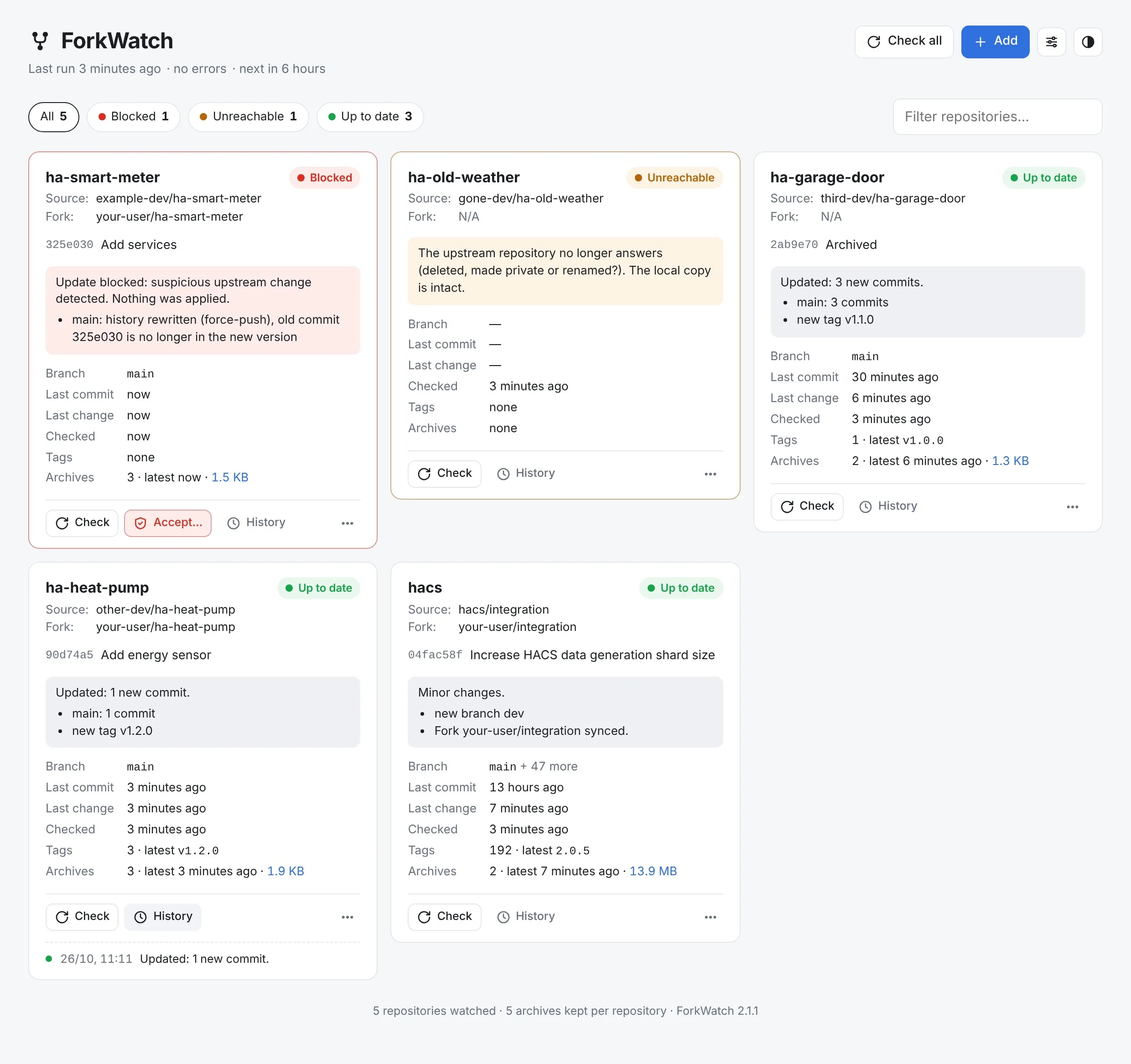
Add a fork by pasting its URL and ForkWatch finds the original repository. Each card shows the state of a repository, its last change and its archives.
- Works with any Git host: GitHub, GitLab, Gitea… Paste a repository URL to watch it directly.
- Check one repository or all of them, pause or remove one.
- History of each repository and archive downloads.
- French or English, light or dark theme.
Suspicious updates are blocked
Before applying a change, ForkWatch analyses it. On the main branch, the one people actually use, it blocks anything that looks wrong and keeps the upstream version aside.
- History rewritten by a force-push.
- A branch suddenly losing a large share of its files.
- Review the reasons and accept a blocked update in one click.
Every version, archived
Before every update, ForkWatch saves the previous state as a .bundle file: the full history in a single file, restorable with a plain git clone.
- Branches and tags deleted or moved upstream are kept.
- Detects changes with git ls-remote: nothing is downloaded when nothing moved.
- Archives can be backed up automatically to a second storage, for safety.
Discord alerts and fork sync
ForkWatch tells you on Discord what changed, in French or English, and can keep your GitHub forks up to date after each healthy update.
- Colored notifications: update, minor change, block, unreachable upstream.
- Optional GitHub token, stored on your server and never shown back.
- Fork detection and sync only work with GitHub.
- Private upstream repositories aren’t supported.
Keep it on your network
The dashboard has no authentication: anyone who can open it can accept updates or change the settings. It’s made for a local network or a VPN.
- Secrets are readable by root only and never sent back by the dashboard.
- Never expose the dashboard publicly on the internet.
Up and running in three steps.
Your settings, archives and Git mirrors live in a single data folder.
- Get the code from GitHub.
- Set your data folder in forkwatch.yaml, then start the container.
- Open the dashboard at http://your-server:9999, paste your Discord webhook in Settings and add your forks.
git clone https://github.com/Aervorn/Docker_ForkWatch.git
cd Docker_ForkWatch
docker compose -f forkwatch.yaml up -d
Full guide in the README →No account, no analytics, no tracking.
ForkWatch runs on your own server and sends nothing to me. It only contacts the Git hosts of the repositories you watch, and optionally the GitHub API and your Discord webhook.
Built with Claude
I come up with the ideas, make the design decisions and test every version on my own machines. Much of the code is written with Claude, Anthropic’s AI assistant. I’d rather say so upfront.